LATAM: Flights, Hotels, Cars
- 4.7
- Rating
- 10.00M
- Installs
- Free
- Price

 Analysis by App-foxy
When I use a travel app, I want it to reduce the number of places I have to check before a trip. LATAM: Flights, Hotels, Cars is built around that idea: it brings flight booking together with hotels, travel packages, and car rentals in one mobile experience. I found its strongest value in keeping the main parts of a LATAM journey close at hand, rather than trying to act as a universal travel marketplace for every airline and every route.
The app comes from LATAM Airlines Group S.A. and sits in the Travel & Local category. It is free, rated for Everyone, and has reached more than ten million installs. Its average score of 4.7 from roughly 454 thousand ratings suggests that the basic experience works well for a large number of travelers, although a high store rating should not be mistaken for a guarantee that every booking situation will be simple.
One booking workspace for a LATAM trip
The capability that matters most here is the combination of flight planning and related travel reservations. Instead of starting with an airline app, moving to a hotel service, then opening another tool for transportation, I can begin with the air journey and consider the rest of the trip around it. That is especially useful when the flight is the fixed part of the itinerary and the hotel or car needs to fit its arrival and departure times.
You May Also Like

 AccuWeather: Weather Radar
AccuWeather Review: A Quick, Clear Forecast for Everyday Decisions
For everyday plans, the best forecast is the one you can understand quickly. AccuWeather makes rain timing, radar, and local conditions easy to act on, with a few trade-offs.

 Hill Climb Racing
Why Hill Climb Racing Still Turns Crashes Into One More Run
A tiny car, a bumpy hill and one more upgrade: Hill Climb Racing keeps resurfacing because its simple chaos makes every near-miss feel personal.

 AliExpress - Shopping App
AliExpress Makes Global Shopping Feel Personal, but Shoppers Bear the Risk
AliExpress turns a global marketplace into a pocket-sized discovery engine. Its reach is useful, its shopping loop compelling, and its trade-offs easy to miss.

 Lords Mobile: Kingdom Wars
Lords Mobile Is a Kingdom-Building Routine, Not a Quick Match
A case-by-case verdict on the building, battles, device demands, and social commitments that make Lords Mobile rewarding for some players and exhausting for others.

 PDF Scanner app - TapScanner
TapScanner Makes Paperwork Easier to Capture, Check, and Share
TapScanner makes scanning with a phone feel less like a rescue operation and more like a dependable step in getting work done. Its capture tools are useful, though not flawless.

 Block Blast!
 Shows How Much a Puzzle Game Can Leave Out
A quiet grid game shows why puzzle players increasingly value instant clarity, repeatable skill and low-pressure play—and where the genre still needs to catch up.
More From Our News Desk
View All News


I would not describe this as a replacement for every travel tool. Its natural center is LATAM travel, so the experience makes the most sense when I am already considering LATAM for the flight. If I am comparing a broad range of airlines, searching for an independent hotel deal, or assembling a complicated itinerary across several unrelated carriers, a general travel marketplace may give me a wider starting point.
What I like about the combined approach is the reduction in mental switching. A trip often has a simple chain: choose the flight, decide where to sleep, then work out how to move around after landing. Having those choices in the same app can make the process feel more coherent. The benefit is not merely that several categories appear together; it is that the flight remains the anchor while the other arrangements are considered in context.
The store summary also positions the app for booking travel packages, not only individual flights. That gives it a useful role for travelers who prefer to organize a holiday in a more bundled way. Still, I would read each part of a package carefully before paying. A convenient combined screen does not remove the need to check dates, passenger details, locations, and the exact conditions attached to each reservation.
What the workflow feels like in everyday use
I approach the app as a planning tool first and a booking tool second. I start by deciding whether LATAM is actually the airline I want for the route. Once that choice is sensible, the app becomes more valuable because the flight search is no longer isolated from the rest of the trip. I can think about the arrival time, the hotel area, and whether a car is useful instead of treating each decision as a separate task.
A practical example would be a short work trip. I might search for a LATAM flight that arrives early enough for a meeting, then look for a hotel that avoids an unnecessarily long transfer, and finally decide whether a rental car is worthwhile. For a city-center stay, I may not need the car at all; for a destination where meetings are spread out, it could make more sense. The app helps me consider those pieces together, but the final decision still depends on the destination and my itinerary.
For a leisure trip, the same workflow can prevent a common mistake: choosing an attractive flight time without thinking about what happens after landing. An arrival late at night can affect hotel check-in plans and transportation choices. A very early departure can make a distant hotel less appealing. By keeping the reservations in one planning flow, the app encourages me to examine those connections before I commit.
One useful habit is to pause after selecting the flight and review the rest of the journey as a timeline. I check whether the hotel dates match the actual arrival and departure dates, especially when the flight crosses midnight. I also consider whether a car is needed for the entire stay or only for part of it. This is a small planning discipline, but it is one of the more valuable effects of the app’s combined structure.
I also recommend reviewing the passenger and traveler information slowly rather than rushing through a familiar booking routine. Airline reservations are unforgiving when a name, date, or travel detail is entered incorrectly. The convenience of one app can encourage speed, and speed is not always helpful at the payment stage.
Where the combined approach has its biggest payoff
The best scenario for me is a straightforward trip in which the flight is operated or selected through LATAM and the hotel or car supports that same journey. This could be a family holiday, a business visit, or a domestic trip with a clear destination and limited changes. In those cases, the app’s central idea feels practical rather than ornamental.
Families can benefit from having the main arrangements gathered in one place. A parent planning several travelers has enough details to manage without scattering confirmations across unrelated services. The app does not eliminate the need to verify every passenger, but it can make the overall booking process easier to follow. I would still save or record the important reservation details separately so that they are easy to find during a busy travel day.
It also suits travelers who already know they want LATAM and do not want to begin with a wide comparison of every airline. That distinction matters. The app’s strength is convenience around a LATAM-centered trip, not necessarily impartial discovery across the whole market. If my first question is “Which airline offers the best combination of schedule and price?”, I would compare outside the app before using it to complete the plan.
Another strong use case is a trip where transportation after landing is uncertain. Instead of automatically renting a car, I can consider the hotel location and the purpose of the visit. If the accommodation is close to the places I need, skipping the car may keep the itinerary simpler. If I am traveling between several areas, checking car options as part of the same plan makes the decision more deliberate.
Travel packages may appeal to people who value a shorter planning process over individually researching every component. I see this as a trade-off rather than an automatic saving. A package can reduce effort, but I would compare the included arrangements with separate bookings when the trip is expensive or unusually flexible. Convenience is most valuable when it prevents mistakes and saves time, not when it stops me from checking whether the arrangement really suits my needs.
Important checks before I confirm anything
The first limitation is scope. This is a LATAM-focused travel app, so travelers who want a neutral search across many airlines may feel constrained. I would not open it expecting the same breadth as a general comparison service. It is better understood as a direct channel for organizing a trip connected to LATAM.
The second limitation is that combining categories can make a booking feel more complete than it really is. A flight, hotel, and car may appear to form one neat itinerary, but each part still deserves its own review. I check the destination of the hotel, the pickup and return locations for a vehicle, and the timing between the flight and the next reservation. A polished workflow should not replace basic travel planning.
The third trade-off concerns flexibility. A traveler with a simple itinerary may appreciate having everything together, while someone making frequent changes may prefer separate services that are optimized for one category. If I am still undecided about the destination, airline, neighborhood, or transportation method, I may get more useful information by researching broadly first and returning to the app once the main choice is clear.
I also consider the phone itself. The current version is 26.31.0 and it supports Android 8.0 or later, so compatibility is broad for many Android users. Even so, I would avoid beginning an important booking with a nearly empty battery, unreliable connectivity, or an outdated device environment. Travel reservations are the kind of task where a stable session and careful confirmation matter more than finishing quickly.
Because the app is free to install, the main cost is not access to the app itself but the travel purchase made through it. I treat the free download as an invitation to browse, not as evidence that a particular flight, hotel, package, or car option is the cheapest possible choice. I still compare the total shown at checkout and make sure the dates and traveler details are right before confirming.
How it compares with the usual alternatives
Compared with a general travel marketplace, the app feels more focused. A marketplace may be the better first stop when I want to scan many airlines, hotel brands, and transportation providers at once. It can help answer the broad question of what is available. LATAM’s app is more appealing after I have decided that a LATAM-centered booking is appropriate and want a direct, connected way to arrange the trip.
Compared with using a mobile browser, the app offers a more dedicated environment for repeat travel planning. I do not have to begin each session by finding the airline’s site and navigating through unrelated browser tabs. That said, a browser can be more comfortable when I need to compare several providers side by side or keep multiple research pages open. The app wins on focus; the browser can win on breadth.
Compared with separate hotel and car apps, its advantage is continuity. I can think about the flight and supporting arrangements as parts of one trip. The disadvantage is that a specialist service may provide a more detailed search experience for its own category. If the hotel is the most important part of my holiday, I may still want to investigate it through a dedicated accommodation service before finalizing the whole plan.
That is why I see this app as a strong companion to broader research rather than a universal replacement for it. I can compare the market when I need to, then use the LATAM app when its direct booking and combined planning are more useful than an open-ended search.
Who will get the most from it
The best audience is a traveler who already prefers LATAM, wants a flight-led itinerary, and values having hotels, packages, and cars available in the same app. It is also a sensible choice for people who take occasional trips and want a clear place to begin without building their own collection of airline and travel tabs.
Business travelers may appreciate the straightforward structure when the destination and dates are known. Families can benefit from keeping the main journey organized in one place. Leisure travelers planning a conventional holiday may find the package and hotel options useful, particularly when they want to spend less time coordinating separate reservations.
I would be more cautious about recommending it to a traveler whose priority is the widest possible comparison. If I am chasing a particular fare across multiple airlines, looking for an unusual multi-city route, or choosing accommodation independently of the flight, I would start elsewhere. The app becomes more persuasive once the LATAM connection is already part of my plan.
Frequent LATAM customers may also find more value than someone who only wants a one-time comparison. Repeated use makes a focused airline app easier to justify, especially when the same person often needs to arrange flights and supporting travel. For a single uncertain trip, the benefit depends much more on whether the app’s focused inventory matches the route and plans I have in mind.
My practical routine for using it well
I begin with the flight dates and destination, then stop to check whether the arrival and departure times fit the real purpose of the trip. Next, I examine the hotel location rather than judging it only by appearance or convenience in the search results. Finally, I decide whether a car solves a genuine transportation problem. This order prevents me from adding services simply because they are available.
Before confirming, I reread the complete itinerary and check the spelling of every traveler’s name. I verify the number of nights against the flight schedule, pay attention to overnight arrivals, and inspect the pickup and return details if I choose a car. These checks are especially important when several reservations are being made during one session.
For a package, I take an extra moment to understand what I am actually selecting. I compare the overall arrangement with the trip I had in mind and avoid assuming that a bundled option is automatically the most flexible or economical. The app makes coordination easier, but my judgment still determines whether the combination is right.
I also keep a backup record of the confirmed itinerary. A single app is convenient, but travel days are not always predictable. Having the key details accessible outside the booking flow gives me more confidence if I need to check a reservation quickly or if I cannot immediately open the app.
My final view after using it
LATAM: Flights, Hotels, Cars succeeds when its focused purpose matches the way I am traveling. Its real strength is not simply offering several travel categories; it is helping me build a flight-led trip without jumping between unrelated services. That can save time, reduce scattered planning, and make practical connections—such as arrival time, hotel location, and car need—easier to notice.
At the same time, I would not use it as my only research tool for every journey. Travelers who need broad airline comparison or highly specialized hotel and car searches may be better served by dedicated alternatives. The app is most convincing when I already want to travel with LATAM and need a convenient way to organize the surrounding details.
With a 4.7 average and more than ten million installs, it is clearly a widely used travel app, and its free access makes it easy to try before committing to a booking. My recommendation is simple: use it as a focused planning and booking workspace, but keep the careful habits that any travel purchase requires. If that balance suits your trip, the app can turn a scattered set of arrangements into a much easier itinerary to manage.
FAQs for LATAM: Flights, Hotels, Cars
01What can I book with the LATAM: Flights, Hotels, Cars app?
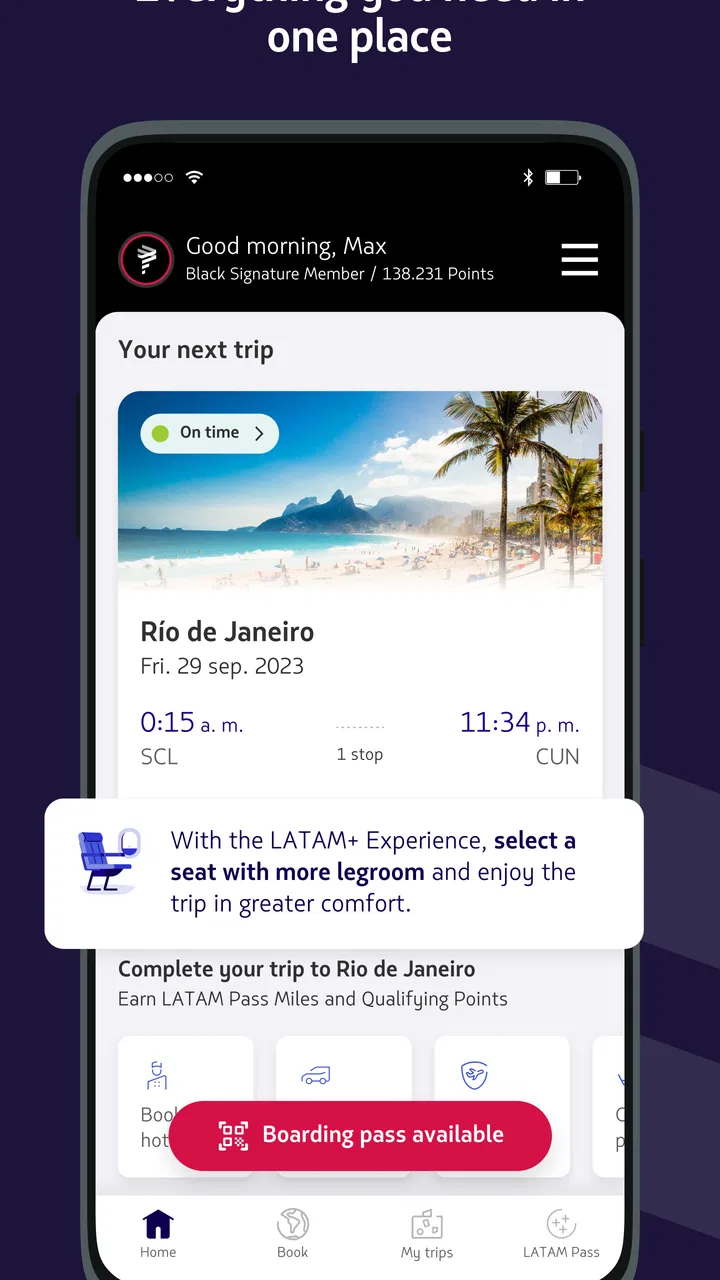
The LATAM app is designed as a central place for planning and managing travel with LATAM Airlines. From the app, you can search and book flights, review available hotel options, and look for car rental services where they are offered. You can also access existing reservations, check itinerary details, and receive important travel information without needing to use a desktop browser.
02Can I check in for my LATAM flight using the app?
Yes, the app generally allows eligible passengers to complete online check-in before departure. You can review your flight, confirm passenger details, and access a mobile boarding pass when the route and booking qualify. Check-in availability may vary depending on the airport, destination, fare, and travel documents, so it is still important to arrive early and follow the airport’s requirements.
03Does the app provide real-time flight status and travel updates?
LATAM’s app can help you monitor important information related to your itinerary, including flight times, boarding details, gate changes, and possible delays when data is available. Notifications may be particularly useful during the hours before departure. However, travelers should also pay attention to airport screens and staff announcements, since operational information can change quickly.
04Can I manage or change an existing LATAM reservation in the app?
In many cases, you can open an existing booking in the app to review your itinerary, passenger information, baggage details, and other trip options. Depending on the fare conditions and route, the app may also guide you through changes, cancellations, seat selection, or additional services. Extra charges and restrictions can apply, so review the final price before confirming any modification.
05Is the LATAM app free, and is it safe to use for bookings?
The LATAM app is generally free to download, although flights, hotels, car rentals, baggage, seats, and other services have their own prices. It is intended for use with LATAM’s official travel services, making it a convenient option for managing reservations and payments. For safety, download it only from the official Google Play Store or Apple App Store and keep it updated.
Pros
- Searches flights
- hotels
- and car rentals in one convenient app.
- Useful filters help narrow results by price
- dates
- stops
- and amenities.
- Supports travel planning across many destinations in Latin America.
- Price comparisons can reveal budget-friendly booking options.
- Trip details and reservations are easy to access from a mobile device.
Cons
- Some offers redirect you to third-party sites to complete the booking.
- Displayed prices may change after taxes
- fees
- or currency conversion.
- Flight availability and fares are not always updated instantly.
- Customer support may depend on the airline
- hotel
- or rental company.
- Some features and deals may vary by country or local market.

LATAM: Flights, Hotels, Cars
Gallery